
I built gohealthcli because I wanted a local copy of my health data.
I wear a Pixel Watch, so a lot of this data is already being collected in the background: steps, heart rate, sleep, exercise, GPS traces when I track a run. The watch sends that data into Google’s health stack.
Google changed that stack recently too. The Google Health API launched on 24 March 2026 as the next generation of the Fitbit Web API, and the Google Health app branding started rolling out on 19 May 2026. That is what made this a good moment to try building a small archive tool around it.
So gohealthcli is not meant to be a product around health data. It is just a small CLI that syncs Google Health data into SQLite, so I can query it, export it, and give it to other tools when I want to.
That is the shape of the tool:
- local first
- read only
- Google Health data in SQLite
- raw provider data saved for later
- normalized views for common questions
- exports for agents, notebooks, scripts, and other tools
The website is here: gohealthcli.bramvanrompuy.be.
The part I wanted to try next was simple: if this data is local and readable, can one of my agents use it for something practical?
How I Built It
I built gohealthcli with the workflow I wrote about in My Agentic Workflow, May 2026, and then followed up on in Agentic Workflow Update, June 2026.
The short version:
- I started with the domain rules, not the commands.
- I wrote down the language: Health Archive, Data Point, Rollup, Sync Run, Sync Cursor, Identity Snapshot.
- I used PRDs and GitHub issues to split the work.
- Agents implemented small slices.
- Tests and review loops kept the slices honest.
- The repo docs became part of the tool, not something separate from it.
That helped because health data has a lot of sharp edges.
A health archive should not casually mutate things. It should not upload private data somewhere. It should not hide what it fetched. It should not make it hard to inspect the raw provider shape when something looks odd.
So the tool is boring on purpose.
sync writes to the archive. query, status, and export read from it. raw lets me inspect provider responses. describe-schema gives an agent enough context to understand the archive before it starts making SQL guesses.
That is most of it.
What You Can Do With It
The obvious uses are small:
- Ask basic questions: how many steps did I take last week, what was my resting heart rate, how much sleep did I log?
- Check trends: did my walking volume go up, did my sleep get worse, did my runs get faster?
- Export clean datasets: daily steps, sleep sessions, exercise sessions, heart rate samples, VO2 max samples, and more.
- Let an agent inspect the schema before asking questions.
- Build small personal tools on top of the archive.
The useful thing is not that this is fancy. It is that I can ask questions about my own health data without first doing a manual export.
For example:
Use my gohealthcli archive.
Show me the days where I walked more than 10,000 steps.
Then compare those days with sleep and resting heart rate.
Or:
Look at my recent runs.
Am I close to running 5K at 5:00 min/km?
What should I train next?
That second one became the better demo.
Adding It To Hermes
I added gohealthcli to my Hermes agent setup. Hermes is my little local agent machine at home, and Herman is the agent running there. On that machine, the archive had already synced.
Then I asked Herman to use it.
The prompt was:
Use the data we already have in gohealthcli and make a new running schedule for Bram.
The goal is to prepare for a 5K run in a month and we want to run at speed 5:00 min/km.
Make a training schedule html webpage so it is easy to follow along.

Make the runs all nearby, so use his previous running data to see where he ran to,
and make runs based out of that. Use Google Maps to visually show the runs for each training too.
It produced a local HTML page with a schedule and maps.
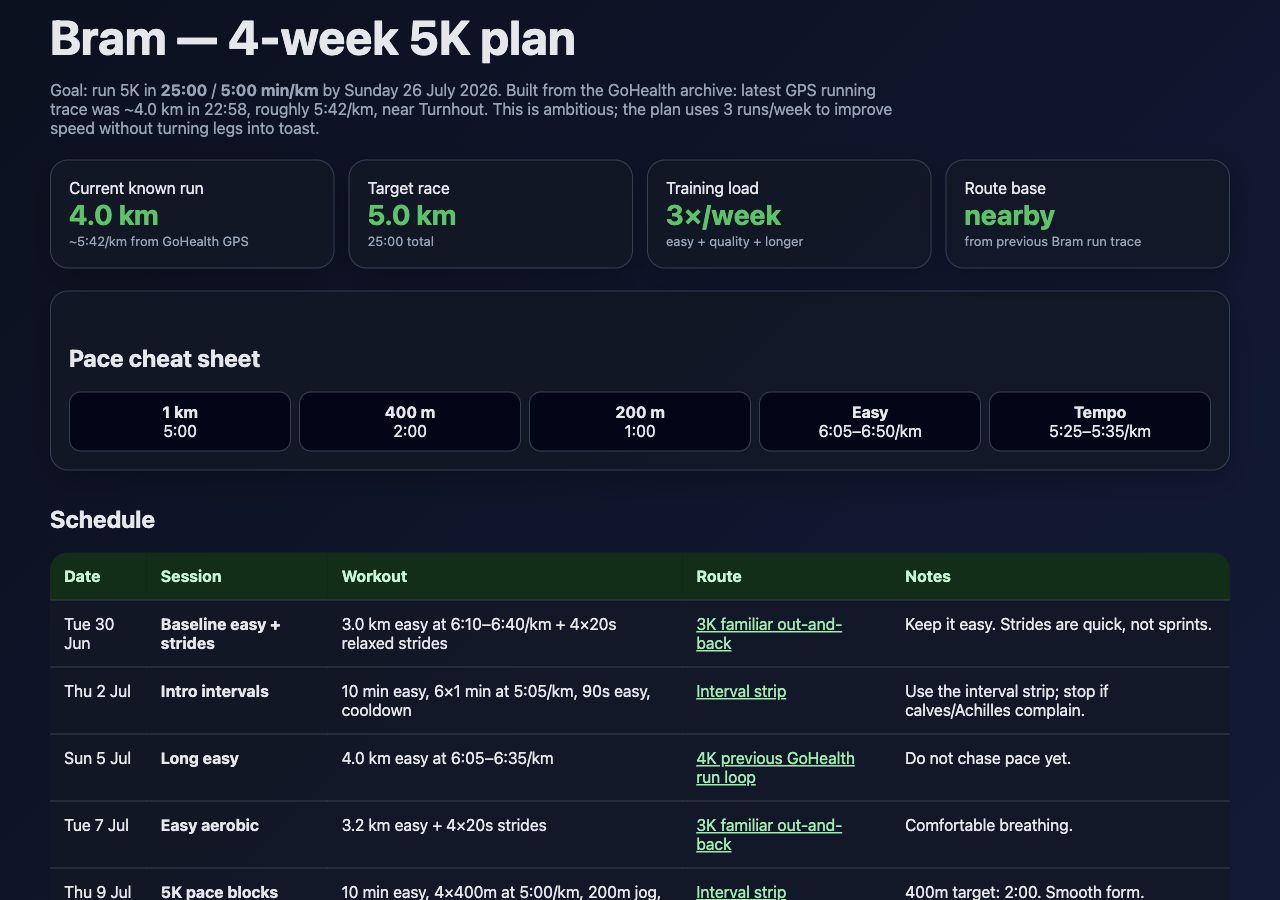
The plan starts from the latest known running trace in the archive: about 4.0 km in about 23 minutes, around 5:42 min/km, near Turnhout.
The goal is much sharper: 5K in 25:00, which is 5:00 min/km.
That is not a huge distance jump, but it is a real pace jump. Herman made a 3 runs per week plan:
- one easy run with strides
- one quality session
- one longer or steady run
The plan ends on Sunday 26 July 2026 with a 5K target run.
The Data I Used
For this post I also refreshed the local archive here.
First I re-linked the Google Health connection:
gohealthcli connect --plain
gohealthcli doctor --online --plain
Then I started a sync to pull newer data:
gohealthcli sync --all --to 2026-06-29 --plain
That sync was slow, mostly because heart rate has a lot of samples.
The result was still useful:
stepscompleted with 4,849 new data points- the local archive had 335,390 data points afterwards
- latest step timestamp was 2026-06-28 13:44 UTC
- latest heart rate timestamp was 2026-06-28 14:12 UTC
For the running part, the archive had 9 running sessions. The longest recent runs were around 4 km. The latest GPS run was the one Hermes used as the route base.
That was enough context for a simple training plan:
- I can already run around 4 km.
- I have enough walking volume to handle 3 runs per week.
- the target pace needs speed work
- the routes should stay familiar
The Running Plan
The month is simple.
Week 1:
- Tue 30 Jun: 3.0 km easy, then 4 relaxed strides
- Thu 2 Jul: 6 times 1 minute at about 5:05 min/km
- Sun 5 Jul: 4.0 km easy
Week 2:
- Tue 7 Jul: 3.2 km easy, then strides
- Thu 9 Jul: 4 times 400 m at 5K pace
- Sun 12 Jul: 4.5 to 5.0 km steady, last 1 km a little quicker
Week 3:
- Tue 14 Jul: 3.0 km very easy
- Thu 16 Jul: 2 km at 5:25 to 5:35 min/km inside a 4 km run
- Sun 19 Jul: 5.0 km easy rehearsal
Week 4:
- Tue 21 Jul: 5 times 400 m at 4:55 to 5:00 min/km
- Thu 23 Jul: 2.5 to 3.0 km easy, then strides
- Sun 26 Jul: 5K target run
The pacing rule for the final run is also simple:
5:08, 5:03, 5:00, 4:58, then empty the tank.
Later I could also use gogcli to push these runs into my calendar if I want reminders or a real weekly schedule.
I checked the watch part too. Hermes could probably do the boring useful version first: make calendar events with the workout text and a Google Maps route link. Pixel Watch shows Google Calendar events, and Maps runs on the watch. That gets the plan onto my wrist without pretending I can push a route straight into the Fitbit run screen.
There is a more proper version too, but that is more work. Health Connect has planned exercises and exercise routes, so Hermes could prepare the data for a small Android bridge. I am not claiming that works yet. It is more a good next experiment.
The Routes
This is the part I liked most.
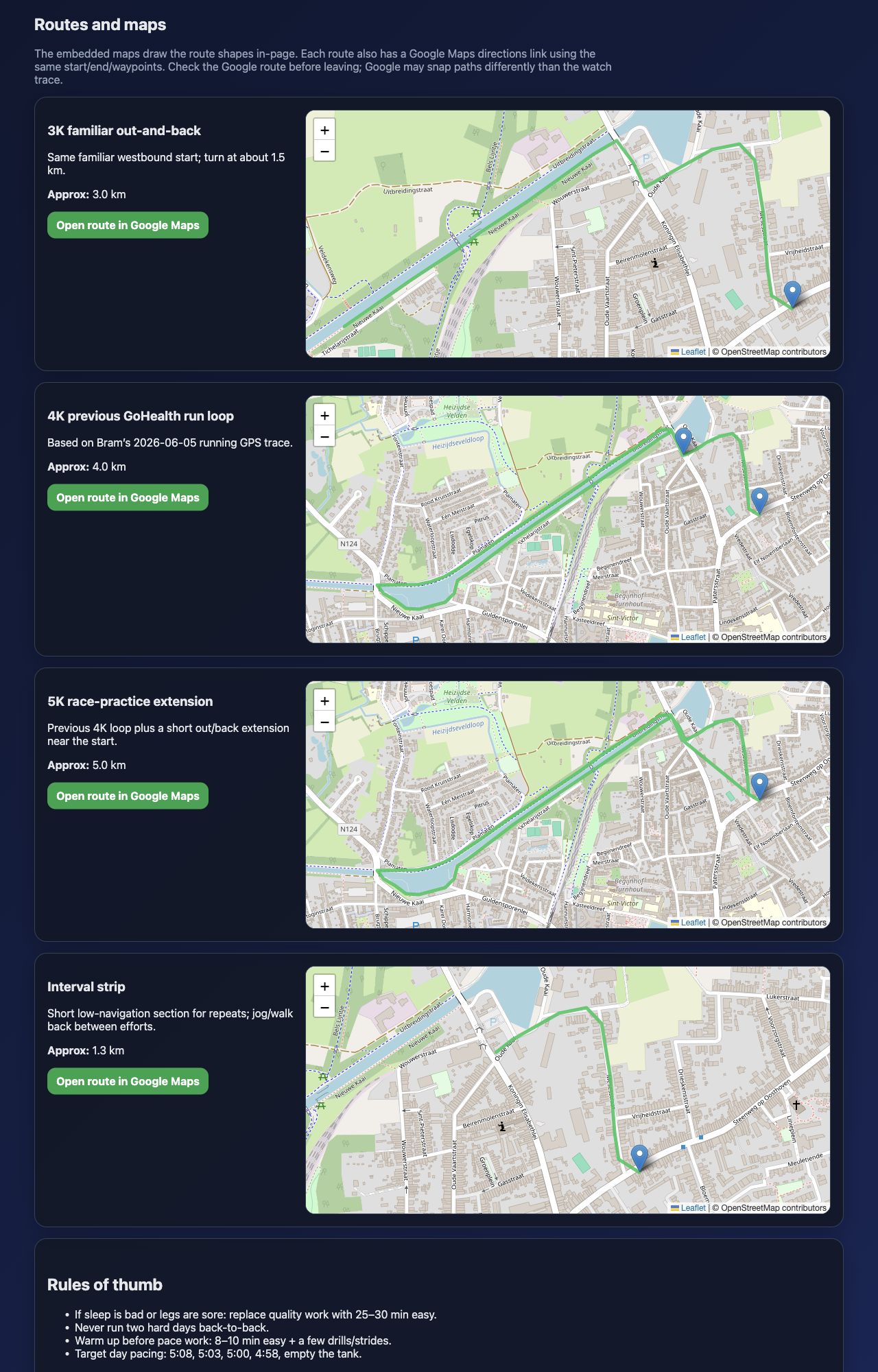
Herman did not only write workouts. It used the previous GPS trace to build familiar routes:
- a 3K out and back
- the previous 4K GoHealth run loop
- a 5K race practice extension
- a short interval strip for repeats
It rendered them in the HTML page with Leaflet and linked each route to Google Maps with the same start, end, and waypoints.
That is how I made this. I am looking forward to playing around more with these kinds of setups. I have a few other CLIs in the making with the same idea, just for different products. More on those later!